
TWINPRICE ON AMAZON
See Amazon prices in your currency
Shopping on an Amazon site from another country? Twinprice shows your own currency beside the prices on the page, so you can compare without a calculator.
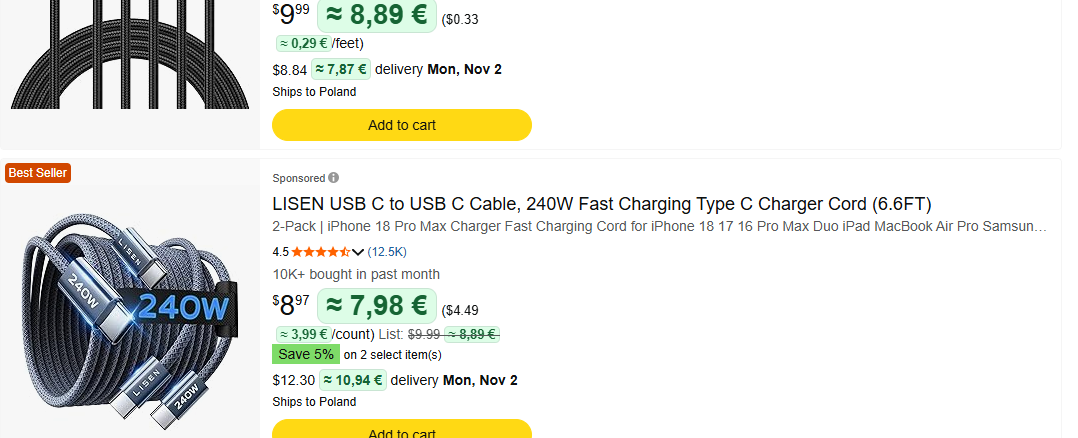
How to convert Amazon prices
- Install Twinprice from the Chrome Web Store or Firefox Add-ons.
- Open an Amazon page, such as search results or a product.
- Click Convert prices when Twinprice offers it on the page, or open Twinprice and click Convert page prices.
- To convert that Amazon site every time, turn on Convert this site automatically in Page options.
What Twinprice converts on Amazon
Prices with a symbol, such as $9.99, and prices with a currency code, such as PLN 34.98, which amazon.com shows when you choose a delivery address in another country. Per-unit prices and crossed-out list prices are converted too.
Before you pay
At checkout, Amazon may offer to charge you in your own currency. Amazon sets that exchange rate, and it can differ from the reference rate Twinprice shows. Your bank or card provider may also use its own rate and add fees.
Twinprice is not affiliated with Amazon.
Free to install. No account needed. Read the getting started guide.